

Online sales are now too large to run on a separate stock list: UAE e-commerce reached AED 42.2 billion in 2025, according to EZDubai and Euromonitor, and Saudi Arabia had 52,259 active e-commerce registrations at the end of September 2026. Overselling is rarely a website problem, though. It happens because the stock figure the website shows is out of date or was never right. This guide explains why retailers oversell, how a single inventory works across stores, website and marketplaces, how to set buffers with a worked example, and how to handle fulfilment, returns and cancellations.
Why do retailers oversell online?
Because the number the customer sees online is not the number on the shelf. The gap opens in one of a few predictable ways.
| Cause | What happens | The fix |
|---|---|---|
| Stock synced to the website once a day | Items sold in store this morning still show online | Update available stock with each sale |
| Online stock kept separately from store stock | Two people sell the same last unit | One stock record for all channels |
| Orders not reserved until they ship | Stock looks available while an order waits to be picked | Reserve stock the moment an order is placed |
| Several marketplaces fed the same full quantity | Two marketplaces sell the last unit at the same minute | Buffers, or a share of stock per marketplace |
| Display, damaged or faulty items counted as stock | The unit exists but can't be sold | Separate statuses for display and damaged stock |
| Stock record wrong in the first place | Unrecorded theft, damage or receiving errors | Regular cycle counts of fast sellers |
The last cause is the hardest. A 2018 Auburn University RFID Lab study found barcode-based store inventory was only about 63% accurate, and IHL Group estimates that out-of-stocks and overstocks together cost retailers 6.2% of sales worldwide in 2026. If the stock record is wrong, a faster sync only spreads the error faster. Fix counting and receiving discipline in the stores alongside the integration.
How does one inventory work across stores, website and marketplaces?
Every location, whether a store, a warehouse or a stockroom, keeps its stock in one system. Every channel, whether the tills, your website or a marketplace, sells from that system and reports each sale back to it straight away. The system then tells each channel how much it can sell.
For that to work, stock needs more than one number. Each location tracks:
| Status | Meaning | Counts as available? |
|---|---|---|
| On hand | Physically in the location | Starting point |
| Reserved | Promised to an order not yet picked or collected | No |
| In transit | On its way between locations | No, until received |
| Display | On the shop floor as a sample | Usually no |
| Damaged or on hold | Waiting for a return decision or repair | No |
| Buffer | Held back to cover sync delays and walk-in customers | No |
Available to sell = on hand − reserved − display − damaged − buffer.
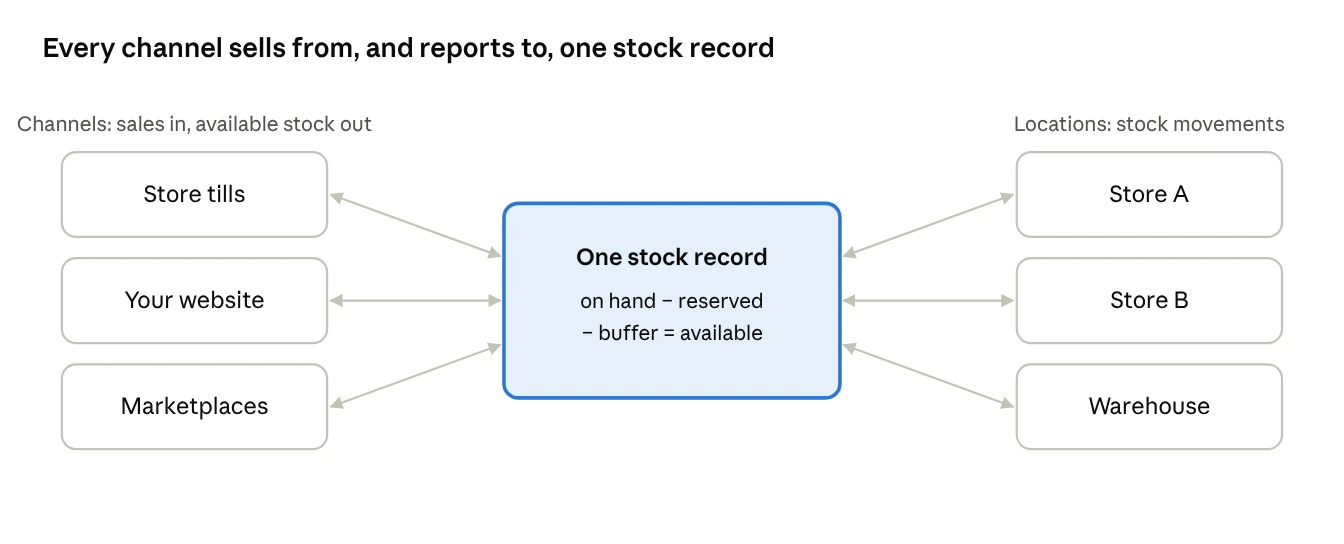
The marketplaces in the region, such as Amazon and noon, and store platforms such as Shopify, Salla and Zid, each take a stock quantity per product. The integration's job is to keep that quantity equal to your available-to-sell figure, and to bring every order back into the same system.
How much stock should you show online? A worked example
Show what you can actually ship or hand over, minus a small buffer for the seconds between a sale and the next stock update. Set the buffer per location: larger where stock moves fast or counts are less reliable, smaller in a well-run warehouse.
A sportswear retailer sells one trainer, in size 42, in two Dubai stores, a warehouse, its own website and one marketplace.
| Location | On hand | Reserved | Display | Buffer | Available to sell |
|---|---|---|---|---|---|
| Warehouse | 20 | 2 web orders waiting to be picked | 0 | 2 | 16 |
| Store A (mall) | 6 | 0 | 1 | 2 | 3 |
| Store B | 3 | 0 | 0 | 2 | 1 |
| Total | 29 | 2 | 1 | 6 | 20 |
Of 29 pairs on hand, 20 are offered online. The stores keep two pairs each for walk-in customers, the warehouse holds two back to cover sync delays, the display pair isn't sold, and the two pairs already promised to web orders aren't offered again.
The retailer then splits the 20 between channels, so no pair is offered twice. The marketplace updates less often, so it gets a fixed share of 6 pairs, and the website shows the other 14 as a live figure. If both channels were sent the full 20, they could take orders for up to 40 pairs between them. When the marketplace sells its 6, the retailer moves more pairs across from the website's share, which falls by the same number.
When the count falls to the last few pairs, the buffers do their job: the website shows "out of stock" while one or two pairs are still on a shelf, which is a better outcome than cancelling an order a customer has already paid for.
The quantities are illustrative. Start with buffers of one or two units on fast sellers and adjust them each month using your cancellation rate.
Should online orders ship from the warehouse or the stores?
Use the warehouse by default and let stores fill the gaps. Shipping from stores turns every shop into a small warehouse, which sells more of the stock you have but needs disciplined staff and accurate counts.
| Option | How it works | Strength | Watch out for |
|---|---|---|---|
| Ship from warehouse | All online orders picked and packed centrally | Efficient and easy to control | Store stock can't be sold online |
| Ship from store | The nearest store with stock picks and hands over to the courier | Sells stock that would otherwise sit in stores; faster local delivery | Picking competes with serving customers; stock must be accurate |
| Click and collect | Customer orders online, collects from a store | No delivery cost; brings customers into the store | Reserved items must actually be set aside |
| Endless aisle | Store staff order an item from the warehouse for a customer in the store | Saves sales when the size is missing | Delivery promise must be realistic |
Whichever you use, the order should reserve stock in the location that will fulfil it, the moment it is placed. Reserving from "the company" in general is how two locations end up promising the same unit.
For click and collect, set a time limit, such as three days, after which uncollected orders are cancelled and the stock released.
How should returns and cancellations update stock?
Every cancellation releases its reservation at once, and every return goes back into stock only after someone has checked it. Both should update the same stock record that feeds the website.
| Event | Stock update | Common mistake |
|---|---|---|
| Order cancelled before picking | Reservation released; item available again | Reservation left in place, so the item looks sold out |
| Online order returned to a store | Item goes into that store's stock after inspection | Item put on the shelf but never booked in |
| Return received at the warehouse | Item checked, then back to available or to damaged | Damaged items returned straight to available stock |
| Marketplace return | Follows the marketplace's process, then booked into the receiving location | Refund issued by the marketplace, stock never booked back |
| Failed delivery | Item returned to the dispatching location | Item left "in transit" for weeks |
An online order returned to a store raises one more question: which channel gets the refund and the sales reversal? The answer should be the original one, so online and store sales both stay accurate. Speed matters too: in Saudi Arabia, the E-Commerce Law lets online customers return unused goods within 7 days and cancel if delivery is more than 15 days late. Our guide to returns, exchanges and refunds covers the store-side rules.
What goes wrong when retailers connect online and store stock?
In the retailers HYP works with, the integration itself is usually the easy part. The trouble comes from item data and store habits that worked fine when the website was small.
| What we see | What it causes | The fix |
|---|---|---|
| Website products set up separately from the POS items | Sales can't be matched to stock | One item list, with the same codes and barcodes everywhere |
| Stock pushed to the website once a night | Overselling on busy days | Updates with every sale, return and transfer |
| Stores selling the last unit reserved for a web order | Cancelled orders and unhappy customers | Reserved stock blocked at the till |
| Transfers sent but not received in the system | Stock sits "in transit" and can't be sold anywhere | Receive every transfer on the day it arrives |
| No counting routine for fast sellers | Available figures drift from reality | Weekly cycle counts of the top items |
HYP keeps store, warehouse and online stock in one record, reserves stock when an order is placed, and updates each channel as sales happen at the tills. See how on our Retail page, and read our guide to when a growing chain needs a retail ERP.
Sources
- IHL Group: Inventory distortion, 2026
- DC Velocity: Auburn University RFID Lab findings on inventory accuracy, 2018
- Zawya: Saudi e-commerce registrations rise 25% in Q3 2026
- Zawya: UAE e-commerce market reaches AED 42.2 billion in 2025 (EZDubai and Euromonitor)
- CMS: Saudi Arabia implements its e-commerce law