
Getting the type wrong is one of the most common errors we see at the till. This guide sets out the differences, a decision flow, four worked examples with 15% VAT, the fields each type needs, and how credit and debit notes follow the original invoice.
What is the difference between a standard and a simplified tax invoice?
A standard tax invoice identifies the buyer and must be cleared by ZATCA before you share it. A simplified tax invoice usually carries no buyer details and is reported to ZATCA within 24 hours after you share it.
| Standard tax invoice | Simplified tax invoice | |
|---|---|---|
| Typical buyer | VAT-registered business or government (B2B, B2G) | Consumer (B2C) |
| Buyer details | Name, address and VAT number | Usually none |
| ZATCA flow | Clearance before sharing with the buyer | Reporting within 24 hours of issue |
| Cryptographic stamp | Applied by ZATCA's FATOORA platform | Applied by your own invoicing system |
| QR code | Generated by ZATCA at clearance | Generated by your own system |
| Invoice type code | 388 | 388 |
| Subtype code starts with | 01 | 02 |
Both are XML files in UBL 2.1 format and carry the same core elements: a unique identifier (UUID), the hash of the previous invoice, and an invoice counter. The type code is the same; what tells ZATCA which kind of invoice it is receiving is the subtype code.
Which invoice should you issue?
Three questions decide it, in this order: is it an export, is the buyer a business or government entity, and is the value under SAR 1,000?
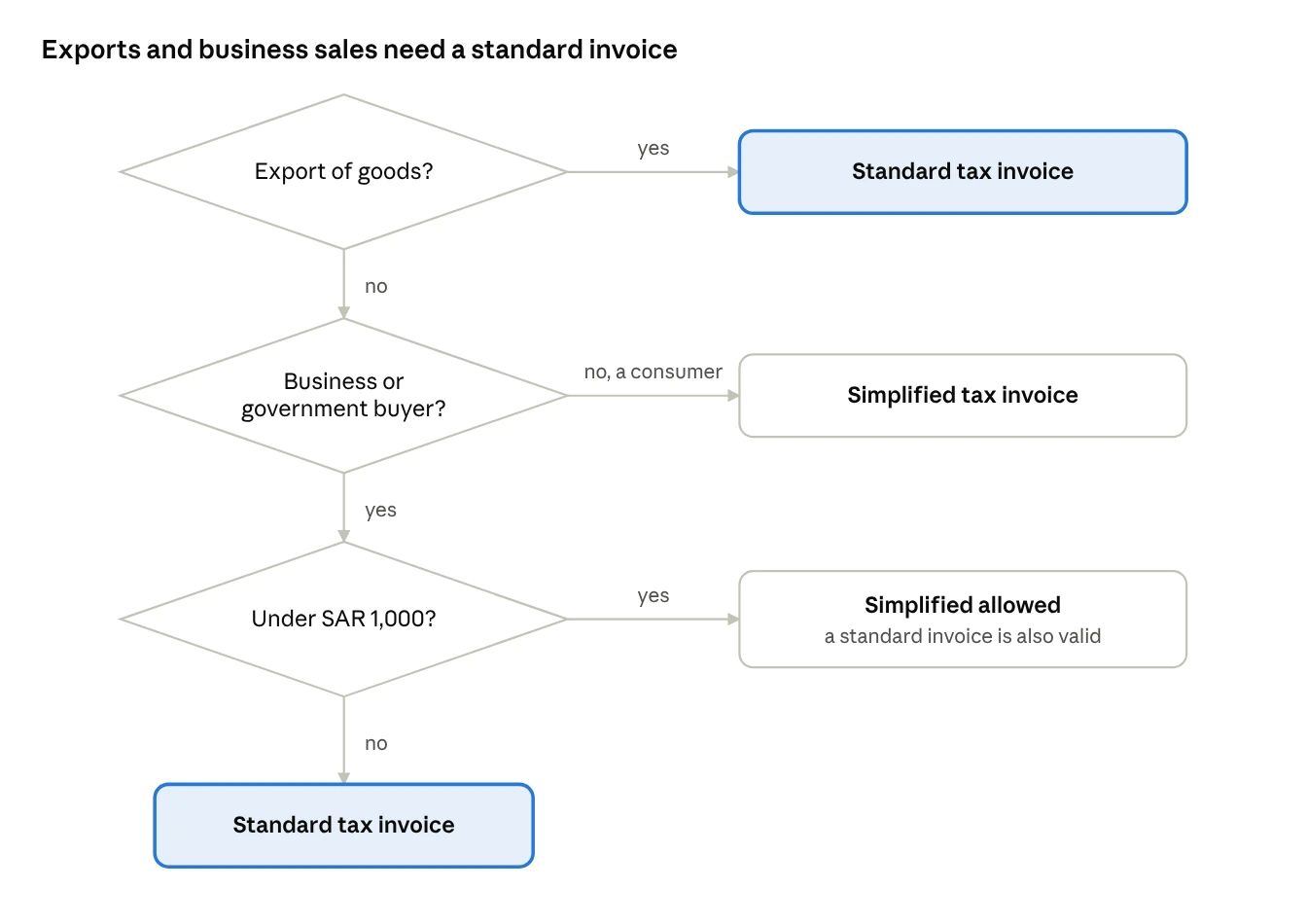
- Export of goods: always a standard tax invoice, whatever the value or the buyer.
- Sale to a business or government entity: a standard tax invoice. If the value is under SAR 1,000, ZATCA lets you issue a simplified invoice instead, but you may still issue a standard one.
- Sale to a consumer: a simplified tax invoice.
A sale to a business that is not VAT registered also needs a standard tax invoice, so capture the buyer's details. A simplified invoice is only for sales to individuals, or to a business when the sale is under SAR 1,000.
What does each invoice look like in practice?
The four examples below cover the cases most businesses meet every week. All use Saudi Arabia's 15% VAT rate.
| Sale | Net (SAR) | VAT (SAR) | Total (SAR) | Invoice to issue | What happens next |
|---|---|---|---|---|---|
| Coffee and a sandwich for a walk-in customer | 40 | 6 | 46 | Simplified | Printed at the till, reported to ZATCA within 24 hours |
| Steel and cement for a contractor | 20,000 | 3,000 | 23,000 | Standard | Sent to ZATCA for clearance, then shared with the contractor |
| Printer paper for a company's office | 800 | 120 | 920 | Simplified allowed, standard preferred | Under SAR 1,000, either type is valid |
| Machinery exported to a UAE customer | 50,000 | 0 (zero-rated) | 50,000 | Standard | Cleared like any standard invoice |
Why the third case matters. The office buyer will want to recover the SAR 120 input VAT. A standard invoice with its name and VAT number gives it the clearest evidence, so many suppliers issue one whenever a business asks, even under SAR 1,000.
Why the fourth case matters. An export is zero-rated, but it still needs a standard tax invoice. A POS set to issue every counter sale as simplified will get exports wrong.
Which fields and codes does each invoice need?
A standard tax invoice needs everything a simplified one does, plus the buyer's name, address and VAT number. The QR code differs too: ZATCA generates it for standard invoices, while your own system generates it for simplified ones.
| Element | Standard | Simplified |
|---|---|---|
| Invoice date and sequential number | Yes | Yes |
| Seller's name, address and VAT number | Yes | Yes |
| Buyer's name, address and VAT number | Yes | No |
| Description of goods or services | Yes | Yes |
| Net amount, VAT rate and VAT amount per line | Yes | Total VAT, or a statement that prices include VAT |
| QR code | Generated by ZATCA at clearance | Generated by your system, including its public key and stamp signature |
The QR code on both types carries the seller's name and VAT number, the invoice timestamp, the total with VAT, the VAT total, the invoice hash and a digital signature.
In the XML, the document type code is 388 for a tax invoice, 381 for a credit note, 383 for a debit note and 386 for a prepayment invoice. The subtype code starting 01 marks a standard invoice and 02 a simplified one; the remaining digits flag special cases such as exports, summary invoices and self-billing. Your invoicing software sets these codes; your job is to make sure it picks the right type.
How do credit and debit notes work for each type?
A credit or debit note follows the type of the invoice it corrects. A note against a standard invoice is a standard note and is cleared; a note against a simplified invoice is a simplified note and is reported within 24 hours. Every note must reference the original invoice and state the reason.
ZATCA's tax invoicing guideline gives you until 15 days after the end of the month following the event that triggers the note.
Worked example. On 10 March 2027 a contractor returns cement that was billed on a standard invoice.
| Item | Amount (SAR) |
|---|---|
| Net value of returned cement | 2,000 |
| VAT at 15% | 300 |
| Total credit | 2,300 |
| Note to issue | Standard credit note, type code 381, referencing the original invoice |
| Latest issue date | 15 May 2027 (end of April plus 15 days) |
Two habits cause rejections. One is deleting the original invoice and issuing a new one: every Phase 2 invoice is chained to the previous one by its hash, so a deleted invoice breaks the chain and deleting invoices is itself a violation. The other is issuing a simplified credit note against a standard invoice because the return was processed at the till. Correct both through a note of the right type.
Which special cases change the invoice type or content?
Five situations have their own rules, and each is flagged in the invoice's subtype code. Set them up in your ERP before you need them.
| Case | Rule | Invoice type |
|---|---|---|
| Export of goods | Always needs a tax invoice, whatever the value or buyer | Standard |
| Summary invoice | One invoice may cover several supplies to the same customer within one calendar month | Standard |
| Self-billing | The buyer issues the invoice for the supplier; needs a prior written agreement, the words "Self-Billing" on the invoice and ZATCA approval | Standard (B2B only) |
| Third-party billing | Someone else issues the invoice for the supplier; the invoice must say so and ZATCA must be notified in advance | Follows the underlying sale |
| Deemed supply | Goods given away or used privately that carry VAT; a tax invoice must still be issued and kept | Follows the underlying supply |
Summary invoices suit distributors who deliver to the same shop several times a month. One standard invoice at month-end replaces many, provided it lists each supply. Self-billing suits large buyers, such as retailers paying many suppliers, but the ZATCA approval step means it cannot be switched on overnight.
Where do businesses choose the wrong invoice type?
In our ZATCA Phase 2 projects with HYP ERP customers, most invoice-type errors happen where a consumer system meets a business buyer: at the till, in delivery orders and in returns.
| What we see | What goes wrong | The fix |
|---|---|---|
| Every POS sale issued as simplified | Business buyers over SAR 1,000 get the wrong invoice | Add a "business customer" button that captures the VAT number and switches to standard |
| Buyer VAT numbers typed by hand | Standard invoices are rejected at clearance | Validate the 15-digit VAT number before the invoice is issued |
| Returns processed at a different branch | The credit note does not match the original invoice type | Look up the original invoice before refunding |
| Exports billed from the POS | Exports issued as simplified | Bill exports from the back office only |
| Corporate catering billed from the restaurant POS | B2B orders issued as simplified | Invoice catering contracts from the ERP |
The common thread is that the invoice type should follow the buyer, not the device. HYP ERP is ZATCA Phase 2 certified, and in our setups the POS and the back office share one customer master, so a business customer is recognised wherever they buy. If your business is new to integration, see ZATCA Wave 25: Is Your Business Included, and What to Do Before 1 February 2027.