
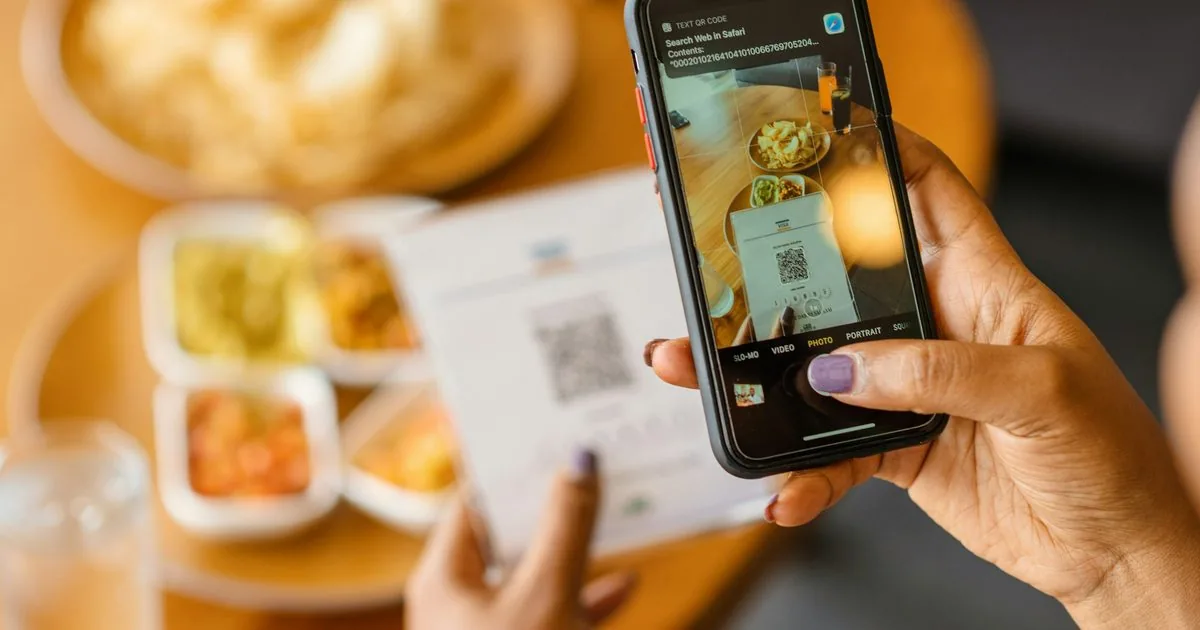
It doesn't replace your team, and it shouldn't. What it changes is where staff time goes: less on writing orders and fetching card machines, more on the parts of service guests remember. This guide explains how it works, the three setups, what changes for each role, a worked lunch service, and the receipt and menu rules in the UAE and Saudi Arabia.
How does QR table ordering work?
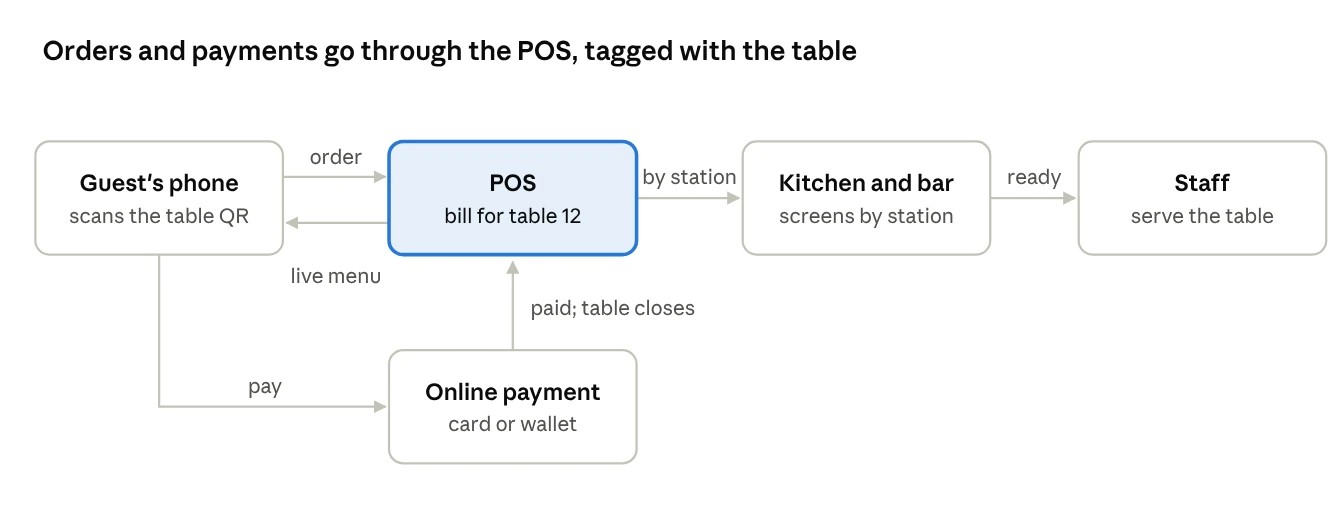
Each table has its own QR code, linked to that table number in the POS. Everything else follows from that link.
- The guest scans the code with their phone camera. The menu opens in the browser, with no app to download.
- They choose items and modifiers, such as spice level or no onions, from the same menu and prices as the POS.
- The order goes to the POS on that table's bill, and on to the kitchen and bar screens by station.
- Staff deliver the food and keep an eye on the table, as they would after taking an order by hand.
- Guests order again from the same page, adding drinks or desserts to the same bill.
- They pay from the phone or ask for the bill as usual, and the table closes in the POS.
Because the QR menu reads from the POS, an item marked unavailable in the kitchen disappears from the phone menu too, and a price change at head office appears on both at once.
Which QR setup should a restaurant choose?
There are three, and they change service by very different amounts. Pick by how much you want the guest to do themselves.
| Menu only | Order, pay staff | Order and pay | |
|---|---|---|---|
| What the guest does | Reads the menu on their phone | Orders from the phone; pays a server at the end | Orders and pays from the phone |
| What staff still do | Take every order and payment | Deliver, check on tables, take payment | Deliver, check on tables, help when asked |
| Connected to the POS | Not necessarily | Yes | Yes, plus a payment gateway |
| Best for | Fine dining; replacing printed menus | Casual dining; cafés with table service | Fast casual, food courts, busy cafés, hotel pools and beaches |
| Watch out for | Out-of-date PDF menus | Guests unsure whether to wait for a server | Splitting bills, tips, guests who won't pay by phone |
A menu-only QR code that opens a PDF is not ordering at all, and it carries a risk: when prices change in the POS but nobody updates the PDF, guests see one price and pay another. If you start there, link the code to a live menu from the POS rather than a file.
Most restaurants that move to ordering keep a way back for guests who prefer it. A server can still take an order on a handheld, and it lands on the same table bill.
What changes for restaurant staff?
The jobs stay; the tasks move. Order taking and payment shift towards the guest, and the time saved goes to running food, resetting tables and hospitality.
| Role | Before QR ordering | After QR ordering |
|---|---|---|
| Server | Takes orders, enters them, runs food, brings the bill and card machine | Greets, explains the menu, runs food, checks on tables, helps guests who prefer to order in person |
| Runner or busser | Clears and resets tables | Same, but tables turn faster, so timing matters more |
| Cashier | Takes payment for most tables | Handles cash, split bills and problems; fewer routine payments |
| Kitchen | Receives orders in bursts as servers enter them | Receives orders as guests place them, often more evenly, plus more add-on orders |
| Manager | Watches the floor | Also watches the order screen for tables waiting too long and guests who need help |
Two things need deliberate training. First, servers should greet every table and explain how to order, rather than leaving guests alone with a code. Second, someone has to own the screen that shows open tables, because a guest who has ordered and paid by phone can otherwise be forgotten until they complain.
How much staff time does QR ordering free up? A worked example
Take a casual restaurant in Riyadh with 40 tables and five servers on Friday lunch, from 12:30 to 3:00. Each table turns twice, so the team serves 80 tables in two and a half hours: 12.5 server-hours in total.
Assume taking an order, including the drinks round, takes 3 minutes per table, and bringing the bill and taking payment takes 2. After the switch to order and pay by phone, 70% of tables use it, and each of those still needs about a minute of help.
| Before | After | |
|---|---|---|
| Tables ordering and paying with a server | 80 × 5 min = 400 min | 24 × 5 min = 120 min |
| Tables using their phones | – | 56 × 1 min = 56 min |
| Server time on orders and payment | 400 min (6.7 hours) | 176 min (2.9 hours) |
About 3.7 server-hours move from order taking and payment to everything else, out of 12.5 on the rota. The restaurant can use that time in two ways: better service with the same team, such as faster table resets and more time with guests, or the same service on a busier day without adding a server.
The example deliberately leaves out revenue. Some restaurants find guests order more add-ons when they can do it without waiting for a server; others see no change. Track your average bill for a month before and after, rather than assuming either.
The minutes are assumptions for illustration. Time a few services yourself before you plan the rota around them.
Which receipt, menu and data rules apply to QR ordering?
The same rules as any other order: the guest gets a proper receipt, prices include VAT, and the menu carries whatever labelling your country requires. In Saudi Arabia that labelling now explicitly covers online menus, so a QR menu must carry it too.
| UAE | Saudi Arabia | |
|---|---|---|
| Receipt | Consumer receipts are outside the e-invoicing system for now; issue your usual tax invoice | Every simplified tax invoice carries ZATCA's QR code and is reported within 24 hours; it can be given electronically if the guest agrees |
| Menu prices | Must include VAT | Must include VAT; VAT can't be added at the till |
| Menu labelling | Dubai's calorie labelling has been voluntary since 2019, as far as we can find | Since 1 July 2025, SFDA rules apply to "all menus, whether physical or online": calories, the exercise needed to burn them, a salt icon on high-sodium meals, and caffeine content |
| Customer data | Ask for consent before using phone numbers for marketing | Personal Data Protection Law: prior consent for marketing, with an easy opt-out |
Two QR codes are easy to confuse in Saudi Arabia. The one on the table opens your menu. The one on the receipt is ZATCA's, and proves the invoice is genuine. A QR ordering system has to produce the second one, through the POS, for every bill.
Don't make guests enter a phone number just to order. Ask for it at payment, with a clear choice about marketing, and keep a printed menu for guests who prefer one.
How do you roll out QR ordering without upsetting guests?
Start with one branch or one section, keep a server-led option for everyone who wants it, and fix the menu data before you print a single code.
In the restaurants HYP works with, the setups that struggle usually have the same few causes. The QR menu is a separate system with its own menu and prices, so it drifts out of step with the POS. Orders arrive in the kitchen as a printout instead of on the kitchen screen. Or the floor team is told the codes will "take the orders", and stops visiting tables.
HYP's QR ordering reads the menu, prices and availability from the POS, puts each order on the right table's bill and kitchen screen, and takes payment on the same bill. See how it works on our Digital Menus & QR Ordering System page, and read our guide to restaurant loyalty programs if you want QR orders to earn points.
Sources
- ZATCA: E-Invoicing Detailed Guideline (QR code and delivery of simplified invoices)
- ZATCA: VAT Guideline for the Retail Sector, May 2026 (VAT-inclusive prices)
- SFDA: menu labelling requirements from 1 July 2025
- Mondaq (Habib Al Mulla): VAT-inclusive displayed prices in the UAE, 2025
- Gulf News: Dubai restaurants and the calorie labelling rule, 2019
- Herbert Smith Freehills: Saudi Arabia's Personal Data Protection Law